
Applies to:
All CB auditors and non-auditors in the ADP
TABLE OF CONTENTS
- Q. Why am I being asked to update my name and photo?
- Q. Who is being required to perform this task?
- Q. How long do I have to complete this task?
- Q. I just recently registered for the ADP. Am I still required to do this?
- Q. What impact does this change have on the ADP Data Protection & Privacy Policy?
- Q. What information do I need to complete the personal information review process?
- Q. What if I don’t have a passport?
- Q. What if I don’t typically use the same name as shown on my Passport or government-issued ID?
- Q. How do I complete the Personal Information Review process?
- Q. What if I don’t have the information I need to complete the process right now? Can I still access the ADP and do this later?
- Q. What if I don’t remember my password or changed my email address and can’t log into the ADP?
- Q. Will this process interfere with my ability to access CARA?
- Q. I’m scheduled to attend an ADP Proctored Session or Phase 2 Evaluation Event soon. What should I do?
- Q. After I update my name, what impact does this have on my Qualification Certificates?
- Q. Once I update my photo this time, when will I have to update it again?
- Q. I made a mistake when updating my name or photo! How do I fix it?
- Q. What if I have more questions or concerns?
Q. Why am I being asked to update my name and photo?
As noted in CB Communiqué 2026-004, the IATF is ensuring alignment of auditor records between the IATF ADP and the IATF Database, and that all auditors/non-auditors are identified in all IATF systems using their full official/legal names, aligned with government-issued IDs. To that end, the IATF is requiring all active auditors and non-auditors to access the ADP within a 45-day period to review the name registered in the ADP and ensure it is aligned to their Passport or other similar government-issued ID document.
In addition, auditors and non-auditors were asked to provide a photo when registering for the ADP in the past, but there has not been a formal process to review/update this photo on a regular basis until now. In the near future, the IATF is planning to make it possible for stakeholders to verify an auditor’s photo when accessing the ADP Certificate Verification Website (including scanning the QR Code on an auditor’s Qualification Certificate). Through the combination of the photo and the auditor’s name matching their government-issued ID, this will provide more assurance to clients and stakeholders that the auditors visiting client facilities are those qualified and authorized to do so.
Q. Who is being required to perform this task?
All active auditors and non-auditors who have accessed training or assessments in the ADP are required to perform this task. If you only ever perform administrative functions in the ADP (such as CB Administrators, CPD Record Admins, Proctors/Evaluators, etc.), you will not be asked to perform this task.
Q. How long do I have to complete this task?
The Personal Information Review window will begin on 23 April 2026 and last for 45 days (until 7 June 2026). All active auditors and non-auditors are asked to log into the ADP Website within this period to complete the necessary steps. CB and Oversight Administrators will be able to use tools in the ADP to track completion status, so there is no need to notify parties of completion (unless your CB indicates otherwise).
Q. I just recently registered for the ADP. Am I still required to do this?
This process will apply to all auditors and non-auditors who registered in the ADP on or prior to 3 April 2026. If you registered for the ADP since that date, you already completed the necessary steps during your registration, so will not be asked to do it again.
Q. What impact does this change have on the ADP Data Protection & Privacy Policy?
The IATF will make it possible for limited outside stakeholders, authorized using the relevant details found on official IATF Qualification Certificates, to verify an auditor/non-auditor’s personal identity using the photo they provide in the ADP. This use of personal information is necessary to ensure the integrity of the IATF scheme, as part of ongoing efforts to reduce the risk of impersonation and/or fraud. Auditor/non-auditor photos will continue to be stored in a secure fashion, with appropriate controls in place to prevent unauthorized access. Only those who scan the QR Code on the Qualification Certificate or enter the Identifying Number and Verification Code found on the certificate, will be able to access qualified auditor/non-auditor photos in this way.
Q. What information do I need to complete the personal information review process?
You will need a copy of your passport or other government-issued ID to ensure the name entered in the ADP matches your official legal name. You’ll be asked to enter your name in Latin-based characters; if your ID also includes your name in other alphabets (such as Chinese, Japanese, or Korean), you’ll be allowed to enter this separately.
You will also need to upload a photo of yourself in either JPEG or PNG format, similar to the kind of photo that you would use on government-issued IDs. The photo should be of you alone and on a simple background, and must have been taken within the last 3 months. The photo upload feature on the ADP website will help you ensure the photo is in the appropriate shape/size. If you don’t already have a photo, you could use a smartphone to take a photo of yourself (a “selfie”) and then either access the ADP website through your phone’s web browser, or email the photo to yourself and then use your desktop/laptop’s web browser to upload it.
Q. What if I don’t have a passport?
If you don’t have an active passport, you may use whatever other form of official government-issued ID you would use for official legal or governmental purposes, such as a Drivers License, Birth Certificate, Social Insurance Card, or other similar IDs. This should be the same ID you would show to a client or IATF representative to verify your identity, or use when performing international travel.
The chosen official government-issued ID needs to provide your name in Latin-style characters, and should be organized as a “Surname” (also known as Last Name, or Family Name), and “Given Name(s)” (also known as First and/or Middle Names, or Prenames). Your name may use accents or diacritics, as appropriate, even if this not normally shown on your ID due to capitalization. The ADP will not require or allow you to enter your name in “ALL CAPS.”
Q. What if I don’t typically use the same name as shown on my Passport or government-issued ID?
Although the IATF requires you to provide your official legal name, we will also provide a few additional options to ensure you’re addressed in your preferred way:
- If you typically use an alternative name, Western Name, or “Nickname,” you’ll be able to provide that during the Name Customization section of Personal Information Review process.
- If you typically write your name in a non-Latin alphabet (such as Chinese, Japanese, or Korean), you’ll be able to also provide this form.
- If you would prefer for the ADP to refer to you in a different way in emails and on the ADP Dashboard, you may also choose to customize this preferred form of address.
Qualification Certificates issued by the ADP will always use your official legal name. However, the information you provide for your alternative name (Western Name/Nickname), if applicable, will be added to the IATF Database.
Q. How do I complete the Personal Information Review process?
Upon logging into the ADP website, eligible auditors and non-auditors will be presented with a window that looks like this:
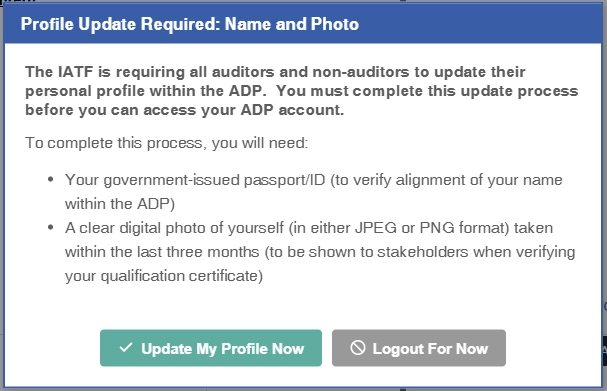
Click on the “Update My Profile Now” to go through the steps. The instructions on each page have been translated into all official ADP languages to help ensure the process is clear and as easy to understand as possible.
Q. What if I don’t have the information I need to complete the process right now? Can I still access the ADP and do this later?
No, you will need to complete the process before you can access the ADP website.
Q. What if I don’t remember my password or changed my email address and can’t log into the ADP?
Please see this Support Article for help with login-related issues.
Q. Will this process interfere with my ability to access CARA?
No, the “ADP Login” feature within CARA will not be impacted by this Personal Information Review process. You must log into the IATF ADP Dashboard to make the change.
Q. I’m scheduled to attend an ADP Proctored Session or Phase 2 Evaluation Event soon. What should I do?
Please log into the ADP from your home or office before your session to complete the Personal Information Review process, including updating your name and photo. If you arrive at a proctored session or Phase 2 Evaluation Event (whether in-person or Live Virtual) and have not yet performed this task, you will generally not be able to continue with your assessments or evaluation until you complete it, and this could result in delays or other complications. Therefore, we strongly encourage all affected auditors and non-auditors to complete the task as soon as possible, well in advance of your scheduled session.
Q. After I update my name, what impact does this have on my Qualification Certificates?
If you change your name in the ADP as part of this process, your existing Qualification Certificates may no longer be valid, or it may no longer be possible to manually verify them using the Certificate Validation Website. Therefore, we strongly recommend you re-download any Qualification Certificates from the ADP website as needed. (You can download certificates by accessing the “History & Certificates” tab on the ADP Dashboard.)
Q. Once I update my photo this time, when will I have to update it again?
The IATF is setting a general policy that photos should be updated every 5 years. If you login to the ADP within 90 days of your photo expiry date, the ADP will prompt you to update your photo. After your photo expires, you’ll be required to update your photo prior to accessing the ADP website.
In addition, if your CB office or an Oversight representative determines there is a problem with your photo, they have the option to delete your existing photo. This will then require you to provide a new photo the next time you login to the ADP Dashboard.
Q. I made a mistake when updating my name or photo! How do I fix it?
If you need to update or correct your photo, please contact your CB Office. Designated CB Administrators in the ADP have the ability to upload photos on behalf of auditors, including making additional corrections to photos after the initial Personal Information Review window is over.
If you need to correct your official name, please contact the ADP Support Team. You may be asked to provide supporting documentation to justify further name changes.
Q. What if I have more questions or concerns?
If you are experiencing any technical problems updating your name or photo in the ADP, please reach out to the ADP Support Team by submitting a ticket. Our team will do our best to help as quickly as possible.